🦀 OpenClaw
The recommended personal agent for Companion Hub. OpenClaw is a coding and computer-use agent harness that runs entirely on your hardware, wired into your Companion Memory so it knows your context — your projects, people, and history — without any of it leaving your appliance.
This is one of the two agent frameworks the Onboarding Wizard offers during first-time setup. If you’re unsure which to pick, pick OpenClaw.
Already running your own OpenClaw? You can connect it to Companion Hub and Companion Memory directly. This page describes the packaged version, which installs stock OpenClaw from npm, so the same endpoints and credentials work against your own install. See Connect OpenClaw.
What it does
- Acts, not just chats — runs multi-step tasks (files, shell, web) against your local environment using the model you selected in the wizard (local Ollama models by default; optional cloud API keys under Advanced).
- Remembers through Companion Memory — when Memory is installed and connected, OpenClaw automatically receives a profile context block, recalls relevant memories for each request, and syncs conversation turns back so your memory keeps growing.
- Speaks the Companion tool catalog — OpenClaw consumes Companion Memory’s typed tools and intents (search, knowledge, people, places, calendar, media) rather than raw database access.
Install & availability
| Hub App Store | Search OpenClaw → Install |
| Works with | Companion Memory (optional but strongly recommended) |
| Model backend | Your Hub’s configured inference (Ollama by default) |
On first launch, the setup terminal walks you through choosing an AI provider and entering an API key — you can skip the hooks prompt for now.
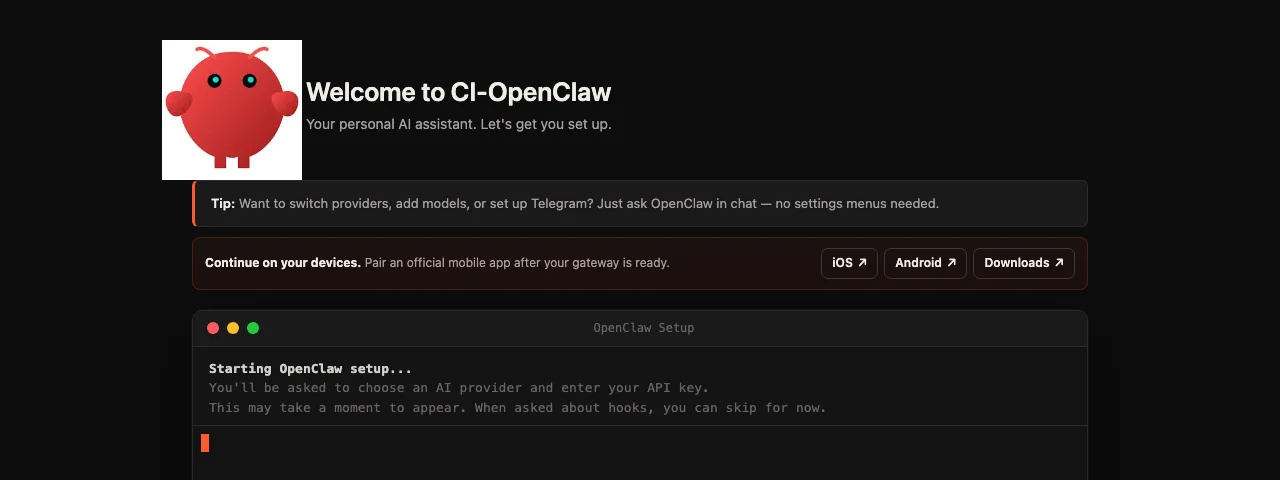
If your Hub has Companion Memory and this app is not yet connected to it, the app puts a Give OpenClaw long-term memory screen in front of itself. Sign in with Companion Intelligence approves a key for this app, Maybe later asks again the next time you open it, and Don’t ask again stops the question. See Connect Companion agents for what the key can do.
Mobile apps
OpenClaw provides official iOS and Android clients for chat, voice, approvals, and device-aware automations. Install and configure CI-OpenClaw first, expose it through Hub’s Private VPN or Web mode, then pair the phone from Devices → Pair device in the OpenClaw Control UI.
Follow the complete OpenClaw mobile setup guide.
Memory integration controls
When Memory is installed and connected, four things flow between it and OpenClaw. Each one is switchable with an environment variable, listed below the diagram.
flowchart TD
    YOU["You<br/>chat, or the iOS / Android clients"] --> OC["OpenClaw on your Hub<br/>multi-step tasks: files, shell, web"]
    OC -->|"inference"| MODEL["Your Hub's model backend<br/>Ollama by default · optional cloud API keys"]
    MEM["Companion Memory"] -->|"profile context block"| OC
    MEM -->|"relevant memories,<br/>per request"| OC
    MEM -->|"typed tools and intents<br/>search · knowledge · people<br/>places · calendar · media"| OC
    OC -->|"conversation turns<br/>synced back"| MEM
The Memory plugin in OpenClaw reads the environment variables below, so an operator can tune how much OpenClaw touches memory — useful for privacy-tiered setups. The app’s install form does not expose them, so they apply where you control the gateway’s environment, such as your own OpenClaw install (see Connect OpenClaw):
| Variable | Controls |
|---|---|
CI_MEMORY_CONTEXT_ENABLED | Profile context block injection |
CI_MEMORY_RECALL_ENABLED | Per-request memory recall |
CI_MEMORY_TURN_ENABLED | Conversation-turn sync back to Memory |
CI_MEMORY_WRITE_ENABLED | Whether the agent may write new memories |
CI_INTENTS_ENABLED | The typed intent catalog |
CI_INTENT_TOOLS_ENABLED | Catalog intents registered as callable tools (also needs CI_INTENTS_ENABLED) |
CI_DISPATCH_ENABLED | Memory dispatch jobs: the agent fetches a job’s briefing and reports progress back to Memory |
Each defaults to on when Memory is connected; turn any off to run, for example, a recall-only agent that never writes.
Choosing between OpenClaw and Hermes: both integrate with Companion Memory the same way and behave equivalently against the same memory contract. OpenClaw is the recommended default and leans toward hands-on computer-use and coding tasks; Hermes leans toward conversational reasoning with its own terminal-style dashboard.
Technical architecture
CI-OpenClaw is open source on GitHub at companionintelligence/CI-OpenClaw . It packages OpenClaw with an automated web setup server, a persistent unprivileged developer toolchain, and native Companion Intelligence plugins.
flowchart TB
    subgraph ClientAccess["Client Access"]
        BrowserUI["OpenClaw Control UI<br/>(Web browser / Mobile App)"]
    end

    subgraph OpenClawContainer["CI-OpenClaw Container Sandbox"]
        direction TB
        SetupServer["Setup & Gateway Daemon<br/>(config-reconcile.cjs)"]
        OpenClawCore["OpenClaw Agent Core<br/>(Node 22 / TypeScript Engine)"]

        subgraph Toolchain["Unprivileged Sandbox Toolchain (user: node)"]
            PyToolchain["Python 3.13 + uv / pip<br/>pytest · httpx"]
            NodeToolchain["Node 22 / npm<br/>/data/.npm-global"]
            BrewToolchain["Homebrew<br/>/home/linuxbrew (jq, ffmpeg)"]
            HeadlessChrome["Headless Chromium<br/>Browser automation"]
        end

        MemoryPlugin["Companion Intelligence Plugin<br/>(openclaw.json mcp provider)"]
        PersistentVolume[("Persistent Storage<br/>/data · workspace, skills, packages")]

        SetupServer -->|"Reconciles openclaw.json"| OpenClawCore
        OpenClawCore --> Toolchain
        OpenClawCore <--> MemoryPlugin
        Toolchain <--> PersistentVolume
    end

    subgraph HubPlatform["Companion Hub Appliance"]
        HubProxy["Traefik Reverse Proxy<br/>(Forward-Auth SSO)"]
        HubMCP["Hub MCP Server<br/>ci-hub:5002/api/mcp"]
        InferenceHost["Local Inference Host<br/>host.docker.internal"]
        MemoryApp["Companion Memory<br/>ci-memory:8642"]
    end

    BrowserUI <-->|"HTTPS"| HubProxy <--> SetupServer
    OpenClawCore <-->|"Streamable HTTP MCP"| HubMCP
    OpenClawCore <-->|"LLM Completions"| InferenceHost
    MemoryPlugin <-->|"Memory Recall & Turns"| MemoryApp
The unprivileged sandbox toolchain
The container runs as the unprivileged node user (UID 1000) with HOME=/data. It is engineered to give autonomous agents full development capabilities without granting root container access:
| Subsystem | Components included | Persistence location |
|---|---|---|
| Python | Python 3.13, pip, venv, uv, uvx, with pytest and httpx pre-installed | Virtual environments in workspace (.venv), or /data/.local |
| Node.js | Node 22, npm | /data/.npm-global for global package installs (npm install -g) |
| System binaries | Homebrew | /home/linuxbrew (bind-mounted from persistent storage) |
| Browser | Headless Chromium | System binary, isolated from host display |
To prevent agents from breaking their container environment, package installation with sudo apt / apt-get is shimmed out. When the agent attempts an apt command, the shim informs the agent to use brew, pip, uv, or npm.
Configuration and model wiring
config-reconcile.cjs: Runs alongside OpenClaw. Translates Hub environment variables (HUB_URL,HUB_MCP_API_KEY,CI_SERVER_URL,CI_SERVER_TOKEN) into OpenClaw’s nativeopenclaw.jsonconfiguration.- Native Hub MCP registration: Automatically creates the
mcp.servers.ci-hubentry using Streamable HTTP, giving the agent one-click tool access to inspect Hub appliances and trigger backups. - Proxy confinement: The OpenClaw gateway is intended exclusively to run behind Companion Hub’s authenticated Traefik proxy and should not be exposed directly to the public internet.