☄️ Photo Time Machine
Turn any photo, image set, or video into a shareable 3D memory. A Gaussian splat or textured mesh you can explore in your browser, on a phone, and in XR — powered by an MCP-first engine and integrated with Companion Memory.
This is the official Photo Time Machine web viewer . It connects to your own Photo Time Machine processing server or runs locally on your Companion Hub.
Open-source repository
CI Photo Time Machine is open source under the PolyForm Noncommercial 1.0.0 license:
- Source code:
github.com/companionintelligence/CI-Spatial-Photo - Container registry:
ghcr.io/companionintelligence/ci-spatial-photo:latest - Marketplace manifest: App ID
ci-photo-time-machine
Install & availability
Available now. Install from the Companion Hub App Store or run via Docker Compose. Ships as a multi-arch container with GPU acceleration and CPU fallback modes.
| Hub App Store | Search Photo Time Machine (ci-photo-time-machine) → Install |
| Web UI port | 5173 (static Spark/Model-Viewer web viewer in CI-Spatial-Photo; demo globe in store) |
| API / MCP port | 8000 (FastAPI backend + Streamable MCP server in CI-Spatial-Photo) |
| Minimum Hub version | 0.2.27 |
| Architecture | linux/amd64 (CUDA GPU recommended) and linux/arm64 (Apple Silicon / CPU) |
| Output formats | Gaussian splats (.spz Niantic compressed, .ply), 3D meshes (.glb, .usdz), .sog |
Store build vs. CI-Spatial-Photo repository: Earlier pre-release builds
shipped a lightweight demo globe known as Photogram or CI Time Machine ·
M2. The open-source
CI-Spatial-Photo
repository and photo.ci.computer implement the
full MCP-first 3D reconstruction service documented in Architecture and
subsystems, while the 6 September 2026 Hub App
Store image still serves the CI Time Machine · M2 demo globe documented in
Overview and Current capabilities.
Architecture and subsystems
CI Photo Time Machine (CI-Spatial-Photo) is designed as an MCP-first 3D processing service. Every neural reconstruction and depth estimation capability is exposed as an MCP tool for agents (Hermes, OpenClaw, Claude Code), while a FastAPI REST surface serves the companion web and XR viewer.
flowchart TD
    subgraph CLIENTS["Clients & Agents"]
        AGENT["Hermes / OpenClaw / Claude Code<br/>(MCP Tools)"]
        WEB["Spark Splat Viewer / WebXR<br/>(Browser & Phone)"]
    end

    subgraph SERVICE["CI Photo Time Machine (Container)"]
        MCP["MCP Server<br/>(FastMCP / Streamable HTTP)"]
        REST["REST API<br/>(FastAPI port 8000)"]
        AUTH["Companion OIDC Auth<br/>(JWKS Bearer Token Verification)"]

        JOB["Async Job Manager<br/>(Queue + State Machine)"]
        ROUTER["Input Router & Engine Registry"]

        subgraph ENGINES["Pluggable 3D Engines"]
            TRIPO["TripoSplat (Default)<br/>MIT code & weights"]
            SHARP["Apple SHARP<br/>Single-image splats (Research)"]
            DEPTH["Depth Engines<br/>Depth Anything V2 · Apple Depth Pro<br/>Video Depth Anything"]
            COLMAP["Photogrammetry<br/>COLMAP → gsplat"]
            MESH["Mesh Engines<br/>TRELLIS · Hunyuan3D"]
        end

        TRANS["Transcode Pipeline<br/>PLY → Niantic SPZ (~10x compression)"]
        STORE[("Asset Store<br/>/data/assets · jobs · metadata")]
    end

    subgraph SUITE["Companion Intelligence Suite"]
        OIDC["Companion OIDC / Portal<br/>(Identity Provider)"]
        MEM["Companion Memory (CI-Server)<br/>(Digital Twin Timeline)"]
    end

    AGENT -->|"image_to_3d · get_job"| MCP
    WEB -->|"GET /api/v1/assets · streams"| REST
    REST & MCP --> AUTH
    AUTH -->|"verify tokens"| OIDC
    REST & MCP --> JOB
    JOB --> ROUTER
    ROUTER --> ENGINES
    ENGINES --> TRANS
    TRANS --> STORE
    JOB -->|"commit 3D memory"| MEM
Pluggable reconstruction and depth engines
Photo Time Machine decouples the client API from underlying neural network checkpoints through an engine adapter registry:
| Engine | Inputs | Outputs | License / terms | Primary use case |
|---|---|---|---|---|
| TripoSplat | Single image | Gaussian splat (.ply, .spz) | MIT (code + weights) | Default fast 3D reconstruction; commercial-friendly. |
| Apple SHARP | Single image | Gaussian splat (.ply) | Non-commercial research only | High-fidelity novel view synthesis from single captures. |
| Depth Anything V2 | Single image / batch | Point cloud / depth map | Apache 2.0 | Monocular metric depth estimation (S, B, L variants). |
| Apple Depth Pro | High-res image | Zero-shot metric depth | Apple Sample Code | Sharp boundary depth estimation without camera intrinsics. |
| Video Depth Anything | Video stream | Spatio-temporal depth | Apache 2.0 | Temporal-consistent depth for dynamic video sequences. |
| COLMAP → gsplat | Multi-view photo sets | 3D Gaussian splats | BSD / Apache 2.0 | Multi-angle room and object photogrammetry. |
| TRELLIS / Hunyuan | Single image | Textured mesh (.glb) | Open research | Solid geometry for physics simulation and 3D printing. |
Transcode pipeline (.ply to .spz)
Raw 3D Gaussian Splatting files generated by neural networks are emitted as standard Stanford Polygon files (.ply), which typically consume 30 MB to 150 MB per capture. Photo Time Machine includes a native transcode worker (server/app/transcode.py) that compresses splat parameters into Niantic SPZ format:
- Quantizes spherical harmonics, position coordinates, and covariance scales.
- Achieves an average 10× reduction in file size (for example, a 35 MB
.plybecomes ~3.2 MB.spz). - Enables streaming over cellular networks to mobile phones and standalone headsets (Meta Quest 3, Apple Vision Pro).
MCP agent contract
Agents running on Companion Hub interact with Photo Time Machine using the Model Context Protocol:
// Example: Hermes creating a 3D memory
{
  "name": "image_to_3d",
  "arguments": {
    "source": "https://hub.local/files/vacation-photo.jpg",
    "engine": "triposplat",
    "format": "spz",
  },
}
// Returns: { "job_id": "job_01j8k9…" }
Key MCP tools exposed by the service:
image_to_3d: Converts a single image into a 3D Gaussian splat or mesh.media_to_3d: Reconstructs 3D scenes from multi-image sequences or video files.get_job: Queries real-time processing progress and status.list_assets: Returns cataloged 3D assets for the authenticated user.get_share_url: Retrieves the shareable WebXR viewer URL for an asset.
When an asset finishes processing, the job manager writes an event record to Companion Memory (CI-Server), indexing the 3D asset metadata, thumbnail, and spatial coordinates into your digital twin timeline.
Web and XR viewer
The companion frontend integrates two 3D runtimes:
- Spark Splat Viewer: WebGL/WebGPU Gaussian splat renderer with support for
.spzstreaming. Features a MediaPipe head-tracked “magic portal” mode using the device’s front-facing camera to calculate off-axis perspective projection in real time. - Google
<model-viewer>: Embedded component for textured.glbmeshes with one-tap AR Quick Look on iOS and Google Scene Viewer on Android.
Overview
Photo Time Machine is a locally hosted 3D globe that demonstrates the spatial-photo experience Companion Intelligence is building toward. In this build the globe is textured with OpenStreetMap map tiles, turns slowly on its own, and shows open-data points of interest and a handful of sample photo pins. It requires a browser with WebGL2 and internet access.
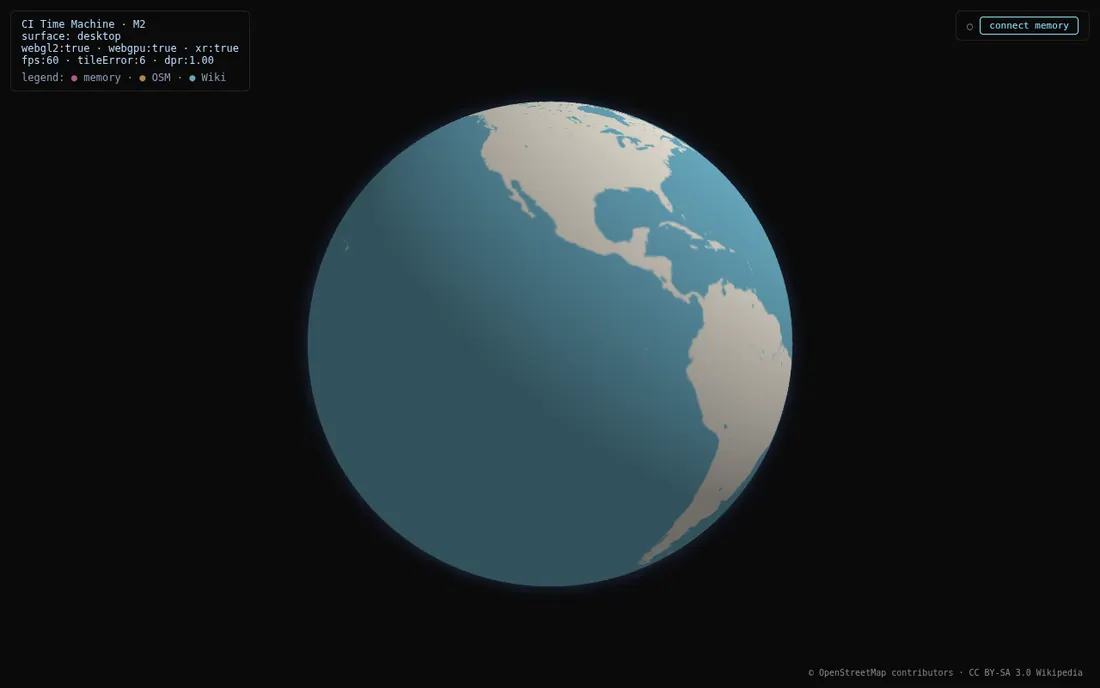
This is a demo of the experience, not yet a personal photo library. The capture apps and the Gaussian-splat trainer that would turn your own photos into 3D scenes are separate components that are not deployed in this image.
Current capabilities
What Photo Time Machine does today, as shipped:
- A 3D globe rendered client-side (needs WebGL2). Its texture is 16 OpenStreetMap tiles at the lowest zoom level, fetched when the page loads. If they can’t load, the globe is a dark sphere
- Open-data POI pins fetched client-side from OpenStreetMap Overpass and Wikipedia , always around Lisbon (the demo’s anchor), not around where you are
- 4 sample photo pins in Lisbon (Praça do Comércio, Belém Tower, Castelo de São Jorge, and Cabo da Roca) to demonstrate the photo-on-globe idea
Network requests in demo mode go to tile.openstreetmap.org, overpass-api.de, and en.wikipedia.org.
This build has no controls: you can’t orbit or zoom the globe, and it has no photo upload or import UI, no timeline scrubber, and no Gaussian-splat rendering. Points of interest and the sample pins are drawn as large discs, so near Lisbon they can cover part of the view. The connect memory button in the top right switches to signing in… and stays there, because no Companion Memory address is built into the image.
Companion Memory connection (build-time only)
Connecting the Hub store demo globe to a Companion Memory instance is configured at build time via Vite environment variables such as VITE_CI_MEMORY_URL. The published store image is built without these set, so it runs in demo mode and cannot fetch from your Companion Memory. To wire it up, rebuild the image with the VITE_CI_* build args.
Planned / roadmap
Described in the product vision but not in this release:
- Importing and managing your own photo collections
- Reconstructing photos and video into 4D Gaussian splats, a photorealistic 3D scene that you can view from any angle (this needs the separate, undeployed splat trainer)
- A capture-app pipeline feeding scenes into the globe
- A timeline scrubber to move through time
- Integration with Companion Spatial and Companion Memory
Use cases
- Watch a globe of OpenStreetMap tiles turn, with open-data landmarks layered on near Lisbon
- Preview how photos pin to real-world locations using the sample Lisbon set
- Evaluate the spatial-photo interface ahead of the capture and reconstruction pipeline
Setup
Install from Hub
Search for Photo Time Machine in the Hub app store and install. It needs Companion Hub 0.2.27 or newer.
Open Photo Time Machine
Open the Local access address on the app’s page in the Hub dashboard, in a WebGL2-capable browser. See Finding your app’s URL. The globe loads and starts to turn, as in the screenshot under Overview. The HUD in the corner confirms it’s running — it reads “CI Time Machine · M2”, not “Photo Time Machine.”
Usage
Watching the globe
The globe turns on its own, about one full turn every three and a half minutes on a 60 Hz screen (the speed follows the screen’s refresh rate). Points of interest and the sample photo pins sit near Lisbon, so they come into view once per turn. The corner HUD is a live debug readout — surface type, webgl2/webgpu/xr support, current fps, tile error setting, and device pixel ratio — useful for confirming the browser is rendering correctly.
Troubleshooting
Globe doesn’t render The browser must support WebGL2. Verify hardware acceleration is enabled.
The globe is a dark sphere with no continents
The globe’s map tiles come from tile.openstreetmap.org. If the device can’t reach that host, the app falls back to a dark sphere. Allow the host, or check the device’s internet access.
No POIs appear
POIs are fetched client-side from overpass-api.de and en.wikipedia.org. If the device has no internet access to those hosts, only the globe and the sample pins are shown.
I can’t rotate or zoom the globe This build has no camera controls: the globe only turns on its own.
Looking for my own photos Photo import and Gaussian-splat reconstruction are not in this demo build — see Planned / roadmap.