📡 Spellbook
The list of local-AI and self-hosting tools that nobody hands you. Spellbook is a static, offline catalog of 797 tools across 16 shelves. Each tool has a description, the platforms it runs on, notes on when to use it, and a link to its source. You browse it, search it, and decide what to install.
The catalog is also published as a website, with nothing to install. Search it there, or install the app from Companion Hub to keep a copy on your own machine.
Open-source repository
CI-Spellbook is open source under the PolyForm Noncommercial 1.0.0 license:
- Source code:
github.com/companionintelligence/CI-Spellbook - Container registry:
ghcr.io/companionintelligence/ci-spellbook:latest - Marketplace manifest: App ID
ci-spellbook
Install & availability
Available now. Install from the Companion Hub App Store. The catalog ships inside the app: no account, no setup, and nothing is fetched at runtime.
| Hub App Store | Search Spellbook (app id ci-spellbook) → Install |
| Container port | 5500 inside the container (mapped to port 18805 in default Hub app store configurations) |
| Architecture | linux/amd64 and linux/arm64 (multi-arch) |
| Requires | Companion Hub v0.2.27 or later |
| State / storage | Stateless; bundled static assets served via NGINX |
| Privacy options | One switch, Share crash reports (on by default). Respects CI_LOCAL_ONLY and CI_TELEMETRY=off. |
Overview
Local AI has no app store: every tool is somebody’s repository, and nobody hands you the list. Spellbook is that list. Its shelves are organized by the job you are doing rather than by vendor, and they run past AI tooling into self-hosting, home servers, and hardware.
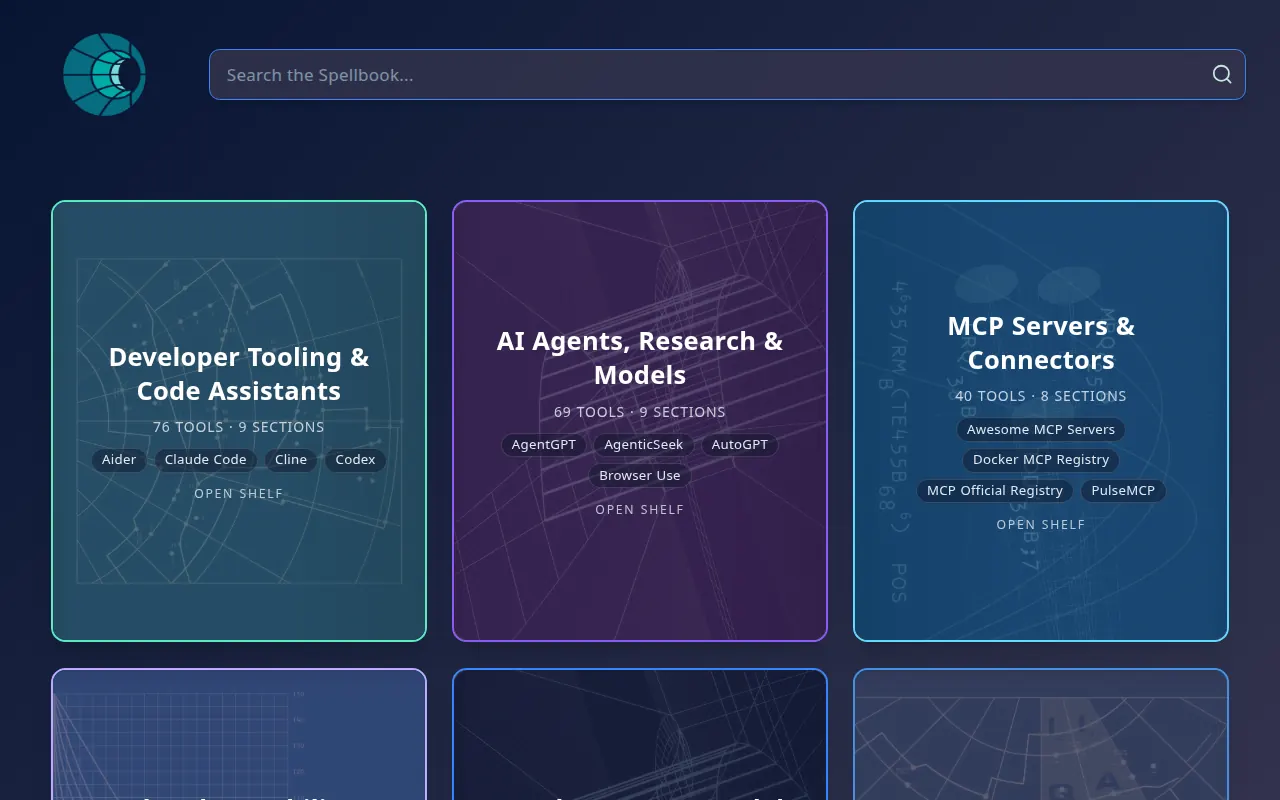
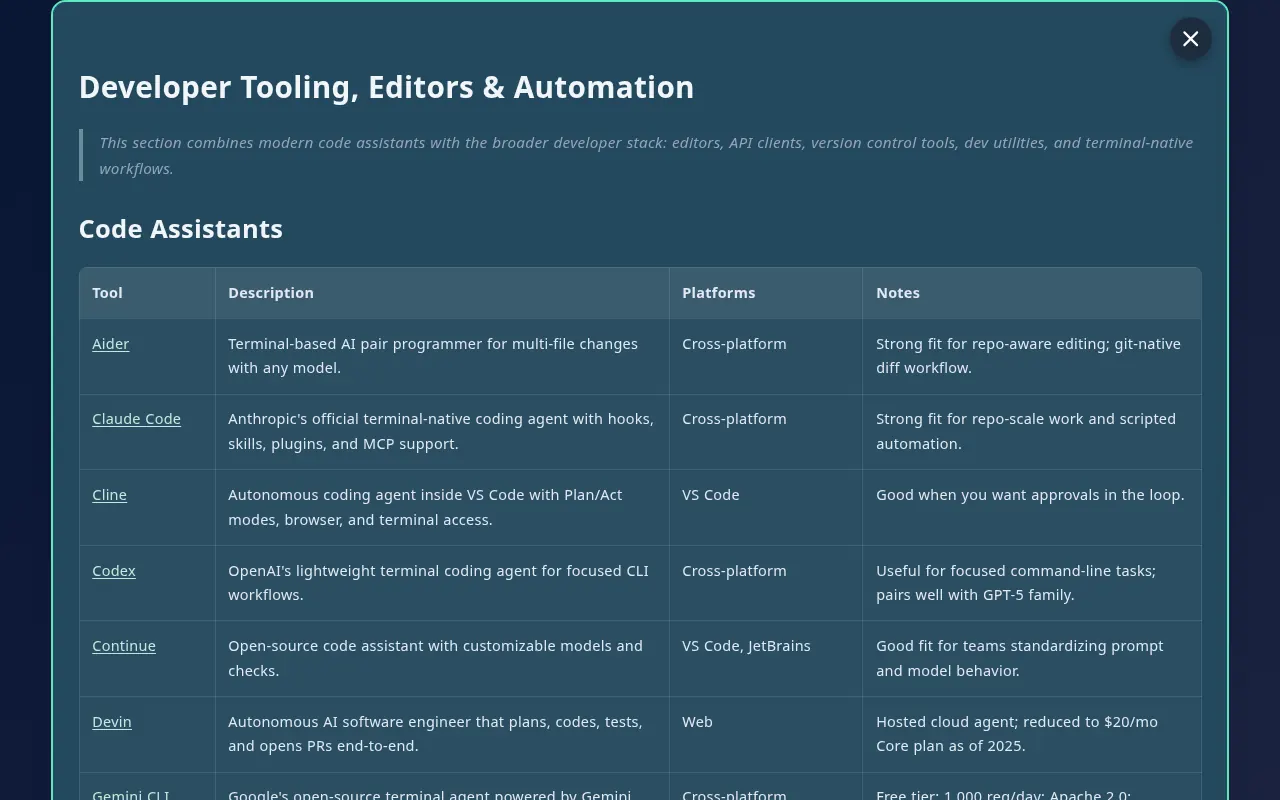
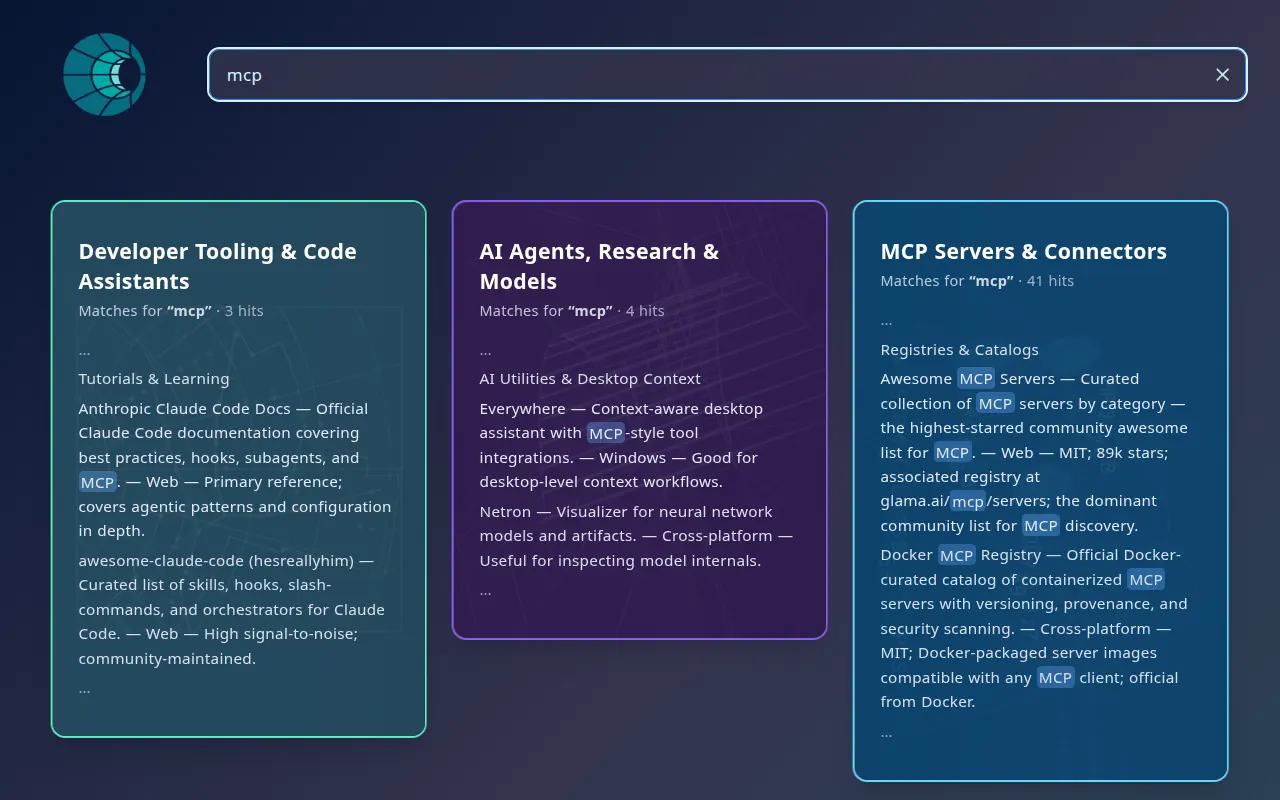
Open a shelf and the back of the card is a table. Each tool gets a row with what it does, the platforms it runs on, notes on when to reach for it, and a link to the source. Search runs in your browser and returns matching lines, highlighted in context, across every shelf.
Spellbook is a reference catalog, not a runtime. It tells you what exists and where to get it. Installing anything it lists is up to you.
Architecture and subsystems
CI-Spellbook is engineered as a zero-dependency, static single-page application (SPA) designed to function even when an appliance has no internet connectivity.
flowchart TD
    subgraph BUILD["Build Time (Vite / Rollup)"]
        SRC["Raw Catalog Shelves<br/>(public/markdown/ + CARD_CONFIGS)"]
        ASSERT["Telemetry Gate<br/>scripts/assert-bundle-without-dsn.mjs"]
        TREE["Tree-Shaking Optimizer<br/>Strips Sentry SDK if no DSN"]
        STATIC["Static HTML / CSS / JS Bundle<br/>dist/ directory"]
        SRC --> TREE --> STATIC
        ASSERT -.->|"asserts no DSN leak"| TREE
    end

    subgraph CONTAINER["Runtime (Docker Container)"]
        NGINX["Hardened Alpine NGINX<br/>(Port 5500)"]
        ENV["Runtime Environment Scrubber<br/>CI_TELEMETRY · CI_LOCAL_ONLY"]
        STATIC --> NGINX
        ENV --> NGINX
    end

    subgraph BROWSER["Client Browser Runtime"]
        IDX["In-Memory Token Index<br/>(797 tools across 16 shelves)"]
        SEARCH["Instant Client-Side Search<br/>(Context highlights · Fuzzy matches)"]
        UI["Shelf / Table Rendering<br/>(Zero external requests)"]
        NGINX -->|"HTTP payload"| BROWSER
        IDX --> SEARCH --> UI
    end
Client-side in-memory search engine
Spellbook avoids backend search engines (such as Elasticsearch or SQLite FTS) by bundling its 16 curated Markdown shelf tables (public/markdown/, registered via CARD_CONFIGS in src/App.jsx) and parsing them into in-memory JavaScript records:
- Instant filtering: Queries are tokenized and matched against tool names, descriptions, supported operating systems, and usage notes directly in the browser’s JavaScript VM, with edit-distance spelling suggestions when a query returns zero hits.
- Contextual excerpt highlighting: Matching substrings are highlighted with surrounding context without causing DOM thrashing.
- Zero query leaks: Search strings never traverse the local network or touch the Hub host filesystem.
Hardened privacy and telemetry pipeline
Spellbook incorporates Companion Intelligence’s appliance privacy controls:
- Build-time tree-shaking: When built without an explicit
VITE_SENTRY_DSN(as with local source checkouts and public container builds), Rollup tree-shakes the Sentry error-monitoring SDK out of the bundle, leaving no telemetry code in the shipped assets. - Bundle assertion gate: The automated build pipeline executes
scripts/assert-bundle-without-dsn.mjs. If an unconfigured build contains any Sentry API calls or tracking symbols, the build fails. - Runtime kill-switches: In production builds containing a DSN, setting
CI_TELEMETRY=offorCI_LOCAL_ONLY=truedeactivates error collection without rebuilding the container. All diagnostic reports pass through a client-side scrubber that purges IP addresses, tokens, and local file paths.
The 16 shelves
- Developer Tooling & Code Assistants
- AI Agents, Research & Models
- MCP Servers & Connectors
- Evals, Observability & Tracing
- Local AI Apps & Model Managers
- Data Platforms, Backup & Sync
- Embeddings & Vector Pipelines
- Knowledge, Notes & Productivity
- Creative Media & AI Art
- Communication, Speech & Collaboration
- Entertainment, Games & Social
- Desktop Systems & Windowing
- Browsers, Automation & Virtualization
- Security, Privacy & Network Access
- Self-Hosting, Home Server & Smart Home
- Hardware, STEM & Edge Labs
Current capabilities
What Spellbook does today, as shipped:
- Browse shelves. Each shelf is a card. Open it to read the table of tools.
- Search across every shelf. Matching lines come back highlighted in context. A search with no matches says so, suggests a spelling when it can, and lists all 16 shelves with their tool counts.
- Works offline. The whole catalog is bundled into the app when the image is built, so the app makes no requests for content at runtime.
Your searches stay on the machine. Search runs in your browser against the bundled catalog. Spellbook has no server that receives your queries. The one thing that can leave your Hub is the diagnostic reporting described in Privacy.
Spellbook is not a prompt library and does not run anything. It has no backend, scheduler, or agent-execution engine, and it does not connect to an LLM or expose MCP tools. It also does not install the tools it lists.
Use cases
- Find the local-AI tool for a job, such as a model manager, an MCP connector, or an eval harness, without searching the whole web.
- Compare tools by the platforms they run on before you commit to one.
- Keep a reference catalog on a fully offline Hub.
Setup
Install from Hub
Search for Spellbook in the Hub App Store and install. The install form has one option, Share crash reports, which is on by default. Turn it off to stop all reporting.
Open Spellbook
Open the app from its card on the Hub dashboard. If a hostname does not resolve on your setup, use the direct port on the card, or see Finding your app’s URL.
The shelves load immediately. No login or LLM connection is needed.
Usage
Browsing
The library opens to all 16 shelves. Open a shelf to read its table of tools. Each row links to the tool’s source.
Searching
Type in the search box. Results show the matching table rows, highlighted, from every shelf. If nothing matches, Spellbook suggests a corrected spelling when it finds one and lists every shelf with its tool count. Try fewer words or a broader term.
Privacy
Spellbook makes no network requests for content and stores nothing about you. When the Share crash reports switch is on, which is the default, your browser sends diagnostics to Companion Intelligence’s error-tracking service (Sentry): errors, performance traces sampled at 10 percent, and session recordings with all text masked and media blocked, taken for 10 percent of sessions and for every session that hits an error. Companion Intelligence states that it strips credentials, file paths, request bodies, and your memories before anything is sent. Turn the switch off in the Hub App Store, or set CI_TELEMETRY=off or CI_LOCAL_ONLY=true on the container, and the app reports nothing.
Changing the catalog
The catalog is built from bundled content, so adding a tool or a shelf means rebuilding the image:
flowchart TD
    MD["Edit or add a markdown file<br/>in Spellbook's bundled content"] --> REG["Register a new shelf in the app's shelf list"]
    REG --> BUILD["Rebuild the container image"]
    BUILD --> INST["Install your build on the Hub"]
    INST --> CARDS["Shelf appears in the library<br/>searchable, with tool counts"]
You can fork the open-source repository at companionintelligence/CI-Spellbook and submit pull requests to add new tools, update descriptions, or fix broken source URLs.
Troubleshooting
I’m looking for a “Run” button or prompt recipes Spellbook lists tools; it does not run anything and is not a prompt library. Follow a row’s link to the tool’s own site, and install it from there or from the Hub App Store.
A search finds nothing Search matches the text in the catalog’s tables. Try fewer words or a broader term, or check the suggested spelling.
The app doesn’t open at the hostname Use the direct port on the app’s card in the Hub dashboard. See Finding your app’s URL.